 Fullcale
A shared family calendar
for plans — and photos
“Are you free Saturday?” “Wait, when is the school event?” A shared calendar ends the back-and-forth texting. Everyone sees the same plans.
When a shared calendar helps
- Couples juggling work shifts, appointments and date nights
- Parents keeping track of school events, doctor visits and pickups
- Roommates, friend groups and clubs planning around each other
What you can do with Fullcale's shared calendars
Invite with a code
Create a shared calendar and send the invite code by text or chat. Once they enter it, they're in. iPhone and Android users can share the same calendar.
Get notified when plans change
When a member adds an event, everyone else gets a push notification — no more “I told you last week”.
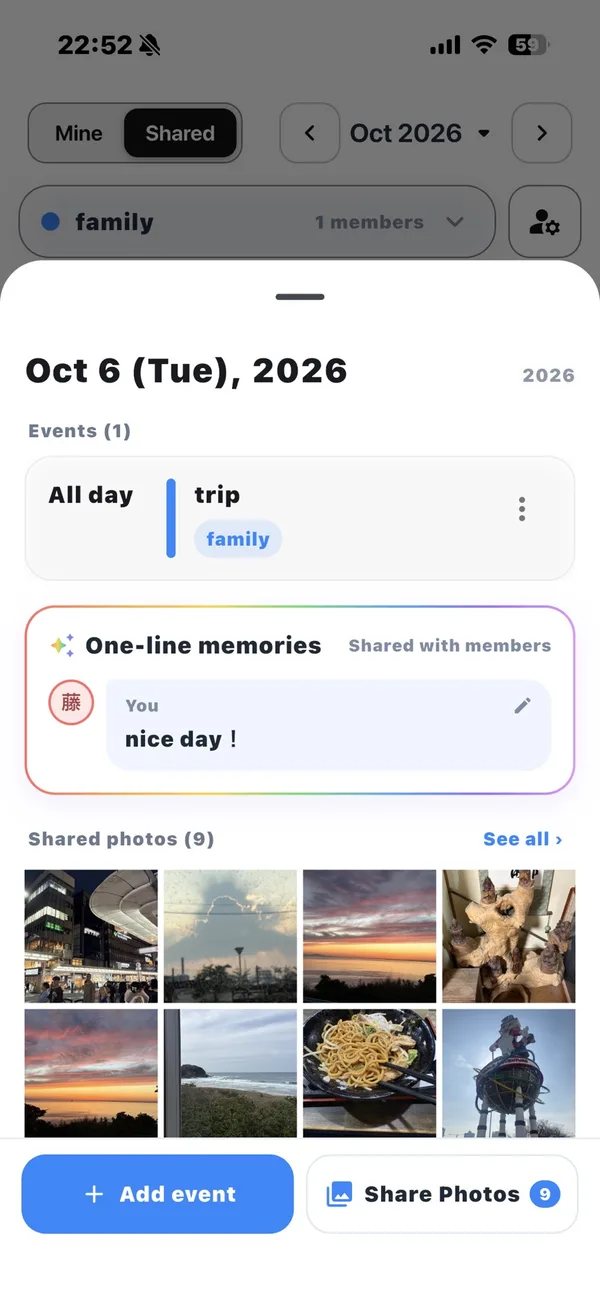
Share photos on each day
Drop photos from a trip or a party onto that day. Instead of scrolling back through a group chat, you open the calendar and they're right there.
One-line memories
Each member can leave a one-line memory for the day. Everyone's lines appear side by side, so you can look back on the same day together.
Keep personal and shared plans separate
Switch between “Mine” and “Shared” at the top left. Only events you put on a shared calendar are visible to its members. You can create up to 10 shared calendars for free, or 20 with Pro.
Your budget and period log stay private — they are never shown to shared-calendar members.
Add to a shared calendar by voice
Open the shared calendar and tap the mic, or start with the calendar's name from anywhere: “Family calendar, dinner Sunday 6pm”.
FAQ
Can iPhone and Android users share a calendar?
Yes. Members on different platforms can use the same shared calendar.
Is the shared calendar free?
Yes. You can create up to 10 shared calendars for free, or 20 with Pro.
Will my personal events be visible?
No. Only events you add to a shared calendar are visible to its members.
Try Fullcale for free
Available on iPhone and Android. The core features are free.